As you add more apps to your Android phone, it becomes more important to be able to manage them properly. The guides in this section will introduce you to, amongst other things, the Application Management screen for your Android phone.
SET APP DEFAULTS
There are many apps available on Google Play which will provide the same or similar functions to your phones' built-in tools. When you download and install one of these apps and then use a particular function it provides, Android will ask you which of the apps you want to use and will give you the option to make it the default app for that function.
In this screenshot you can see that the choices for sending a message are the stock SMS app, or Handcent SMS. To pick a default app, tick the Use by default for this action option and then choose whichever you wish to use.
REMOVE APP DEFAULTS
If for any reason you decide that the default app you have chosen is not the one you want to use all the time, you can easily remove its default status.
Go to
Settings > Applications > Manage Applications. Choose the app you want to alter and scroll down the Application Info screen until you see the Clear Defaults button. Touch this to reset the default status of the app.
MOVE TO SD CARD
An alternative to uninstalling an app, is moving it to the SD Card in your phone. This is also done via Settings > Applications > Application Management. Select the app you wish to move and then instead of clicking Uninstall, touch the button below it labelled Move to SD Card. This removes it from the internal phone memory and places it on the removable SD Card. Not all apps will allow you to do this and not all apps will work from the SD card (or they may have reduced functions).
REMOVING APPS
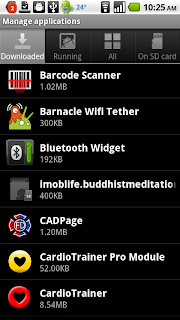
Most apps take up just a few MB of space in your phone memory, so most modern Android phones can fit a lot of apps inside them before they start to run out of space. If, for whatever reason, you wish to remove an app, the process is simple.
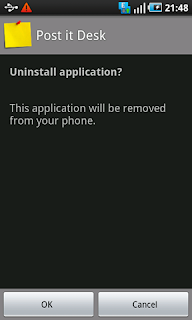
Go to
Settings > Applications > Manage Applications. The tabs at the top will show you Downloaded Apps, Running Apps, All Apps and Apps on SD Card. The tab titles are fairly self explanatory, so for now concentrate on Downloaded Apps.
Select the app you wish to remove and then touch the Uninstall button. Confirm that you want to remove the app on the next screen and click Ok. If uninstall a paid app and then decide you want to reinstall it, you will be able to download it again from Google Play for free.
CHECK FOR APP UPDATES
If you have tried clearing the cache and data, and the app is still not working properly, it is worth checking to see if there are any updates available for it. If the issue is known, the developer may have released an update which fixes the problem.
Open Google Play on your phone and open the My Apps screen from the tabs at the top of the page. If the problem app has "Update" next to it, click on it and choose Update from the next screen. It is also worth ticking the Allow Automatic Updating option so that you keep up to date with future updates.
FIX PROBLEM APPS
From time to time you might find that an app is not behaving as it should. You might see an error message pop up on screen or you might not. Sometimes an app just won't seem to open, despite repeated tries. In these circumstances, there are several things you can do to try to resolve the issue.
Go to
Settings > Applications > Manage Applications and select the Running Apps tab at the top of the screen. Have a look to see if the app is shown as Running (if not, select the All Apps tab) and select it to see the Application Info screen.
FORCE STOP
This might sound worse than it actually is. It simply forces the app to stop running. You can then try running the app again to see if it works properly.
CLEAR CACHE
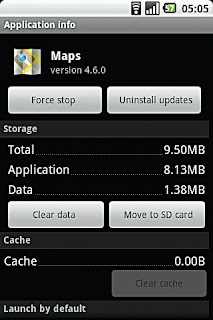
If the app still doesn't work properly, try clearing the cache. This removes files and data that the app has stored to help it run smoothly. No essential data will be lost when you Clear Cache. Go back and try running the app again.
CLEAR DATA
Your third option, if the app is still not working as it should, is Clear Data. This is more drastic (for the app) than clearing the cache and will remove stored password and settings. This basically restores the app to its original state when you first installed it.
UNINSTALL
The fourth button on the App Info is self-explanatory. If nothing else has helped, uninstall the app and download it again.


 Most apps take up just a few MB of space in your phone memory, so most modern Android phones can fit a lot of apps inside them before they start to run out of space. If, for whatever reason, you wish to remove an app, the process is simple.
 Go to Settings > Applications > Manage Applications. The tabs at the top will show you Downloaded Apps, Running Apps, All Apps and Apps on SD Card. The tab titles are fairly self explanatory, so for now concentrate on Downloaded Apps.
 If the app still doesn't work properly, try clearing the cache. This removes files and data that the app has stored to help it run smoothly. No essential data will be lost when you Clear Cache. Go back and try running the app again.

 This
e-book reader from Amazon allows you to browse, buy and
read any of the
thousands of eBooks available on the website. The Kindle store is well
organised into categories of Books, Magazines and Newspapers, as well
as Bestsellers, New Additions and Free Popular Classics. Just getting through
the free e-book classics would take anyone a long time, so when you consider
the thousands of premium e-books available from the Internet giant, you can see
that this idea has some legs.
This
e-book reader from Amazon allows you to browse, buy and
read any of the
thousands of eBooks available on the website. The Kindle store is well
organised into categories of Books, Magazines and Newspapers, as well
as Bestsellers, New Additions and Free Popular Classics. Just getting through
the free e-book classics would take anyone a long time, so when you consider
the thousands of premium e-books available from the Internet giant, you can see
that this idea has some legs.
